
How to Search Cases by Name
The Washington Courts Case Records Search is the broad first pass for a Whatcom County case lookup. Select the court level before entering a name. Superior Court covers major civil, felony, domestic, probate, guardianship, and juvenile matters. Whatcom District Court and six named municipal courts appear under limited courts. A search against the wrong level can return nothing even when the case exists.
- Choose Superior Courts or District and Municipal Courts.
- Select the exact Whatcom court named on the paper or citation.
- Choose name search, then enter the legal last and first names.
- Add the case type and filing year to narrow common-name results.
- Compare court, case number, year, case type, and party role before opening a hit.
Business parties belong in business-name search where offered. Punctuation, spacing, abbreviations, and a changed name can alter results. Search records identify cases, not identity. Verify the match with the court of record.
| Field Label | Type | Required | Notes |
|---|---|---|---|
| Court level | Tab | Yes | Superior, limited, or appellate |
| Search type | Choice | Yes | Name, case number, or business name |
| Court | Dropdown | Yes | Choose Whatcom Superior, District, or the named city court |
| Case type | Dropdown | No | Options depend on court level |
| Year filed | Dropdown | No | Use the year from the notice when known |
| First and last name | Text | Conditional | Shown for a person-name search |
Seven Whatcom Limited-Court Choices
The limited-court dropdown lists Whatcom District Court plus Bellingham, Blaine, Everson/Nooksack, Ferndale, Lynden, and Sumas Municipal Courts. Those are separate filing places. A city citation or misdemeanor may remain with its municipal clerk, while a county infraction, small claim, or limited civil matter may sit in District Court. Selecting “Whatcom” in a broad sense is not enough.
Use the issuing agency and court name on the document to select the right entry. If the paper lacks a clear court, contact the issuing clerk or compare the case number in the statewide index. Appeals from a limited court may later reach Whatcom County Superior Court, so the lower and appellate records can have linked but distinct numbers.
How to Search by Case Number
A case number is the most precise key because it avoids collisions between people or firms with similar names. Preserve its zeros, punctuation, and court suffix as shown. The public Whatcom water adjudication illustrates a Superior format: 24-2-80000-37. In that number, the first segment marks the filing year, the second is a case-type code, the central digits identify the sequence, and the final digits are the county designation. Other court levels use their own formats.
Enter at least the portal's stated minimum. Odyssey's guide permits a minimum of four case-number characters, but a full number produces a cleaner result. If the number fails, test the exact format printed by the court and confirm that the correct search type was selected. Do not strip meaningful zeros or assume a Superior number works in a municipal tab.
Whatcom Odyssey Smart Search
For a Superior Court case, repeat the search in Odyssey Smart Search. It accepts a record or case number and party names in “Last, First Middle” form. Names are not case sensitive. A trailing asterisk can expand a partial term. The guide requires at least one first-name character and three last-name characters. It also notes that spaces, apostrophes, hyphens, and other punctuation affect matching.
Advanced criteria include Whatcom County, case type, case status, file-date range, and judicial officer. Search types extend to attorney bar number, attorney name, business name, case cross-reference number, case number, citation number, judicial officer, nickname, and party name. Party tools include business, nickname, and sounds-like choices. FBI, sheriff, and booking-number fields also appear, though some asterisk-marked features in the guide are unavailable in Washington Odyssey.
The official Smart Search entry shows the portal used for those criteria.
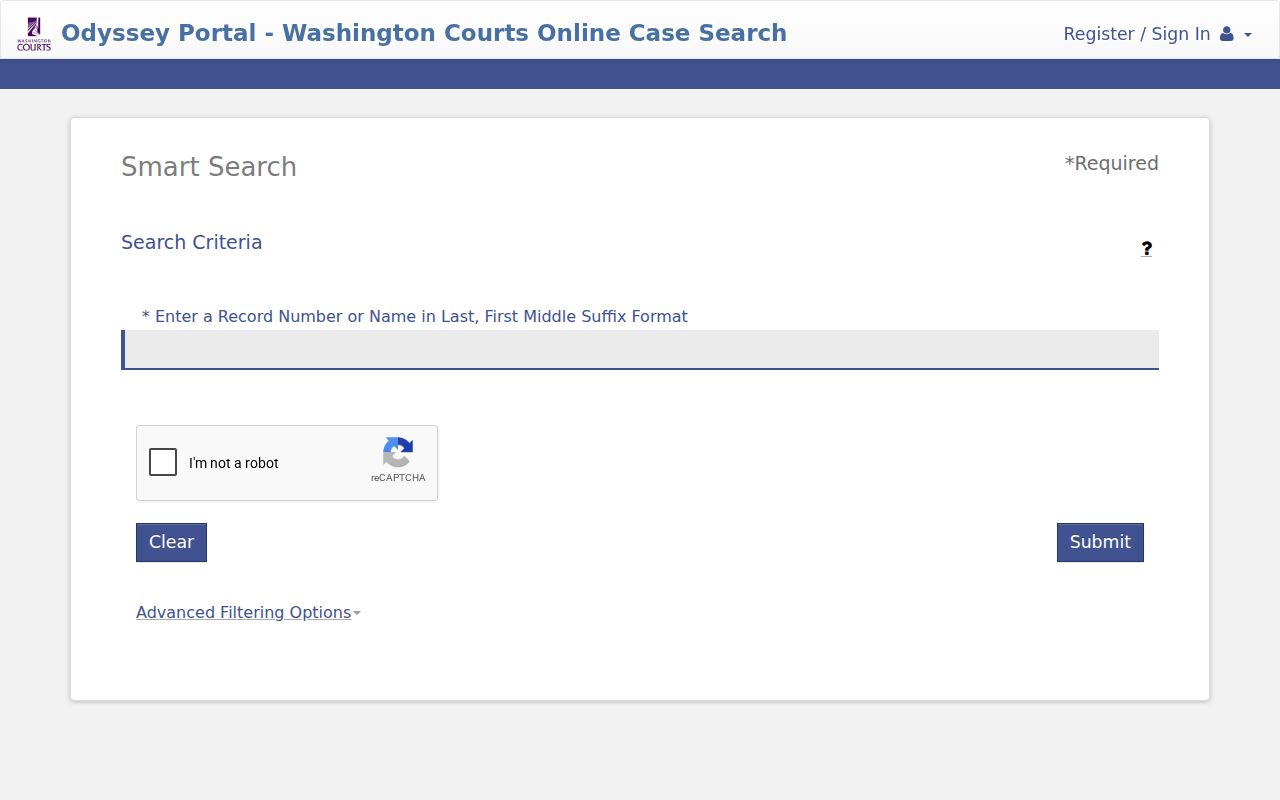
The image identifies the search route, while the court record remains the source for current and certified information.
What a Case Search Shows
The Odyssey result grid and its sanitized official samples provide a clear field inventory without exposing a private Whatcom case. A row may lead to case information, party data, disposition events, events, and hearings. That detail resembles a register of actions, which is a chronological event history. It is not a promise that each underlying document can be downloaded.
| Case Number | The unique court identifier, such as the format 24-2-80000-37. |
|---|---|
| File Date | The date the clerk accepted the initiating filing. |
| Type | The category, such as civil, criminal, domestic, probate, or guardianship. |
| Location | The filing court or county shown by the portal. |
| Party Name | The indexed party and role, subject to access and redaction rules. |
| Events | Filings, appearances, motions, orders, settings, disposition, and later activity. |
| Hearings | Date, time, hearing type, courtroom, judicial officer, and public remote details when shown. |
An event label is a summary. “Motion filed” does not mean relief was granted. “Continued” means a setting moved, and an old date may remain in history. Obtain the public order from the clerk when its exact terms matter.
Narrowing a Large Whatcom Result Set
Odyssey displays only the first 200 results, according to its official guide. A broad common-name query can therefore hide the needed record beyond that cutoff. Narrow the search by Whatcom County, case type, case status, filing dates, or the exact case number. Sort and filter the result grid by number, file date, type, location, or party name.
Soundex helps with similar-sounding party, business, or attorney names. A wildcard helps with a known prefix. They cannot be combined. If neither works, return to the legal spelling on a notice and test only punctuation or spacing variants allowed by the guide. A broader query is not always a better query.
County vs Statewide Case Search
Whatcom County does not operate one all-court case portal. The statewide index spans court levels, Odyssey adds Superior Court detail, and each clerk controls the original record. Find My Court Date has a narrower role for future limited-court hearings.
| Search Route | Coverage | Best Use | Main Limit |
|---|---|---|---|
| Washington Case Records Search | Superior, limited, and appellate indexes | Identify court, number, type, and year | Reference index updated within 24 hours |
| Odyssey Smart Search | Whatcom Superior case information | Advanced criteria and register-style events | Documents are not guaranteed |
| Find My Court Date | Future District and municipal dates | Confirm a coming limited-court setting | Not a complete case history |
| Maintaining clerk | Original court file | Documents, current status, copies, terminal access | Separate request rules and possible fees |
JIS-Link is another official, fee-based subscriber route to selected non-confidential JIS and SCOMIS screens. It reports case docket data, not case documents, and is not needed for an ordinary public lookup.
When a Whatcom Search Finds Nothing
A no-result message does not prove no case exists. Check the court level, filing year, case type, number format, and name spelling. State data can lag by up to 24 hours. Restricted, sealed, or confidential information may not appear. A city case may be held by its municipal clerk rather than the Superior Court Clerk.
Next, call or visit the maintaining clerk. The Whatcom County Superior Court Clerk is at Suite 301, 311 Grand Avenue, Bellingham, and can be reached at 360-778-5560. Whatcom District Court maintains its own records. Municipal clerks control their city files. A courthouse public terminal or a clerk request can reach information that a remote interface does not display. Mail and email options depend on the court and requested product.
From Whatcom Search Hit to Document
A case hit and a court document are different products. The result may list a complaint, motion, order, judgment, minutes, or hearing without offering the image. Contact the clerk that keeps the case and provide the case number, document title, and filing date. Ask whether inspection, a plain copy, or a certified copy fits the need. The broader Whatcom County court record search explains those record routes.
Washington General Rule 31 governs access to court records. The county Public Records Act request portal covers administrative agency records, not judicial case files. Sending a court-document request to the general county portal can delay it. For Superior matters, use the Superior Court Clerk. For District or municipal matters, use that court's clerk.
Restricted Cases and Access Rules
Public access does not mean unrestricted access to every name, attachment, or image. Washington General Rule 15 addresses sealing, redaction, and destruction. General Rule 22 limits access to specified family, protection-order, guardianship, and therapeutic-court material. Juvenile information is also governed by RCW 13.50.050. A limited index marker may remain even when the contents are unavailable.
Ask the maintaining clerk about the lawful request process when a case or document is restricted. Court staff cannot override an access rule or a sealing order. A requester may need a court motion, proof of authorization, or a redacted public version, depending on the record. Never treat the absence of a public search result as proof of dismissal, expungement, or no filing.
Reference, not certification. The statewide index and Odyssey support public case lookup, but the originating clerk supplies the authoritative current record and certified copies.