
Whatcom County Court Calendars Explained
There is no single Whatcom County court calendar for every case. Whatcom County Superior Court publishes recurring calendar blocks and rotation schedules. Whatcom County District Court posts calendar and remote-hearing instructions that can change during the day. Bellingham, Blaine, Ferndale, Lynden, Everson/Nooksack, and Sumas Municipal Courts each control their own city settings. The court name on a notice, citation, or case record is therefore the first key to a sound calendar search.
Superior Court organizes much of its work by hearing type, assigned department, and rotating judicial officer. The county calendar hub links observed holidays, weekly commissioner calendars, criminal rotation calendars, and the general schedule. Those sources describe regular patterns, not an unchangeable promise that a hearing will proceed. District and municipal calendars have their own session rules. A reader should match the case to its court before comparing a posted schedule with the next event shown in the case record.
Whatcom Superior Calendar Blocks
The official Superior Court schedule shows how recurring Whatcom County court dates cluster by case stage. In-custody first appearances are listed daily at 3:00 p.m. in Commissioner Courtroom 5B. Out-of-custody first appearances are listed Friday at 8:30 a.m. in the Department 3 courtroom. Out-of-custody pleas and motions appear Tuesday mornings, while the in-custody counterpart appears Thursday mornings. Trial call and omnibus matters are listed Monday, and status matters Wednesday, each at 8:30 a.m. with a rotating judge.
Domestic show-cause settings use another pattern. The schedule lists Tuesday in 5A, Wednesday in 513, Thursday in 4C, and Friday in 5A, all at 1:30 p.m. Parties must confirm by noon two judicial days before the setting through the clerk at 360-778-5560, option 2, or the listed commissioner confirmation email. This local confirmation step matters. A place in the recurring schedule alone does not show that a specific case was confirmed.
Finding Your Whatcom County Court Date
Use the narrowest reliable identifier available, ideally the case number and exact filing court. The Washington Find My Court Date tool covers future District and municipal hearings. Superior matters require the Superior calendar, Washington Courts Case Records Search, Odyssey hearing search, or direct confirmation with the assigned department. These channels serve different courts, so a blank result in one is not a final answer.
- Read the court name and case number from the latest notice, citation, or filed paper.
- For District or municipal court, search Find My Court Date by court, first name, and last name.
- For Superior Court, check the county calendar and Odyssey Search Hearings, then compare the case record.
- Call the maintaining clerk: Superior at 360-778-5560, District at 360-778-5400, or the named municipal clerk.
- Ask counsel or the assigned Superior judicial assistant to confirm the date, courtroom, and remote option.
- Check courthouse or courtroom postings on arrival because a same-day assignment may differ from an older printout.
A person without online access may use the clerk counter or public-terminal process. The statewide system also offers JIS-Link as a paid subscriber route, though ordinary date checks do not require it. For a deeper case history after finding the setting, use the Whatcom County case lookup.
Three Whatcom Calendar Routes
Choosing a Whatcom County court calendar by scope prevents false no-result conclusions. The official sources divide the task this way:
| Route | Best Use | Limit |
|---|---|---|
| Superior calendar and Odyssey | Superior civil, criminal, domestic, probate, and mental-health hearings | Rotation and hearing data may change; confirm with the department |
| District calendar page | County limited-jurisdiction settings and remote links | A judicial officer can require in-person attendance |
| Find My Court Date | Future District and municipal dates | It is not a complete Superior docket or case file |
The split reflects separate courts, not duplicate databases. The statewide case index can help identify where a matter was filed. The maintaining clerk remains the best source for a live change or a question about access.
How to Read a Court Setting
A calendar result must be read as a group of fields. The date and time place the matter on a docket call. The hearing type explains why it is set. Courtroom and judicial-officer fields tell the reader where and before whom it is expected to proceed. Missing or conflicting fields call for confirmation, not guesswork.
| Date | The scheduled calendar day, subject to a later order, continuance, or amended rotation. |
|---|---|
| Time | The docket-call time, which may be shared by many matters rather than an exact start. |
| Courtroom | The room or remote calendar assignment; check the latest court notice before appearing. |
| Judge | The assigned or rotating judicial officer; assistants coordinate Superior department matters. |
| Setting Type | The stage, such as first appearance, omnibus, status, motion, show cause, or trial call. |
Odyssey Search Hearings may also show county, file-date range, hearing-date range, and search criteria based on case, party, business, attorney, bar number, judicial officer, or courtroom. One result may open the Register of Actions. Several results remain in a results list.
Whatcom Court Setting Terms
Recurring labels summarize a procedural step. They do not state the final outcome of the case.
- First appearance
- An early criminal setting where the charge, custody, and next steps may be addressed.
- Omnibus or trial call
- A case-management setting used to review readiness and issues before trial.
- Status calendar
- A check on progress, pending work, or the next needed event.
- Show cause
- A setting at which a party must address why requested relief should or should not issue.
- Continuance
- A move from the old setting to a later one; the old date may remain in history.
A motion on the docket is only a request. An order is the judge's directive. When those records conflict with a brief calendar label, obtain the public order or ask the clerk which setting controls.
Continuances, Resets, and Cancellations
A continuance moves a Whatcom County court date. A cancellation or vacated setting removes it. Neither term means the whole case was dismissed, sealed, or destroyed. The old hearing can remain in the register of actions even after a new date controls. Read entries in chronological order and look for a later order, hearing, or notice.
The statewide index says data is updated within 24 hours, so it is not real time. Whatcom District Court warns that calendars may update throughout the day. Superior rotation schedules can also be amended. If a hearing moved, compare the latest docket event with the current calendar, then contact the assigned assistant or clerk. Do this again close to the hearing. A saved screen, old email, or recurring weekly pattern may no longer control.
Remote Whatcom Court Appearances
The District Court calendar page says people may generally appear by video or telephone unless the judicial officer directs otherwise, but a specific calendar may bar remote participation. The 1:30 p.m. in-custody calendar is identified as unavailable for remote appearances. District Court can be reached at 360-778-5400 for the current link and rule.
Superior Court remote access is department-specific. The county materials use different lead-time language for moving and non-moving parties, and not every case receives Zoom access. Contact the assigned judge's assistant and follow the latest department instruction. Bellingham Municipal Court provides closed-circuit public viewing of jail hearings in the courthouse basement, which is viewing access and not permission to appear remotely.
Whatcom Odyssey Hearing Search
The Odyssey Search Hearings page is the detailed online route for Whatcom Superior settings. Select Whatcom County and a hearing type: Civil, Criminal, Family, Probate, or Mental Health. Searches may use a case number, party, business, attorney, attorney bar number, judicial officer, or courtroom. File-date and hearing-date ranges narrow crowded results.
Soundex can find similar-sounding names in party, business, or attorney searches. The official Odyssey guide warns that Soundex and a wildcard cannot be combined. A case number is usually more precise than either. Search Hearings is still a public reference. It may open the register of actions, but it does not guarantee that every filed document is available or that a posted date has not changed.
The official captured interface shows the local entry point used for hearing searches.
View the official Odyssey Search Hearings source.
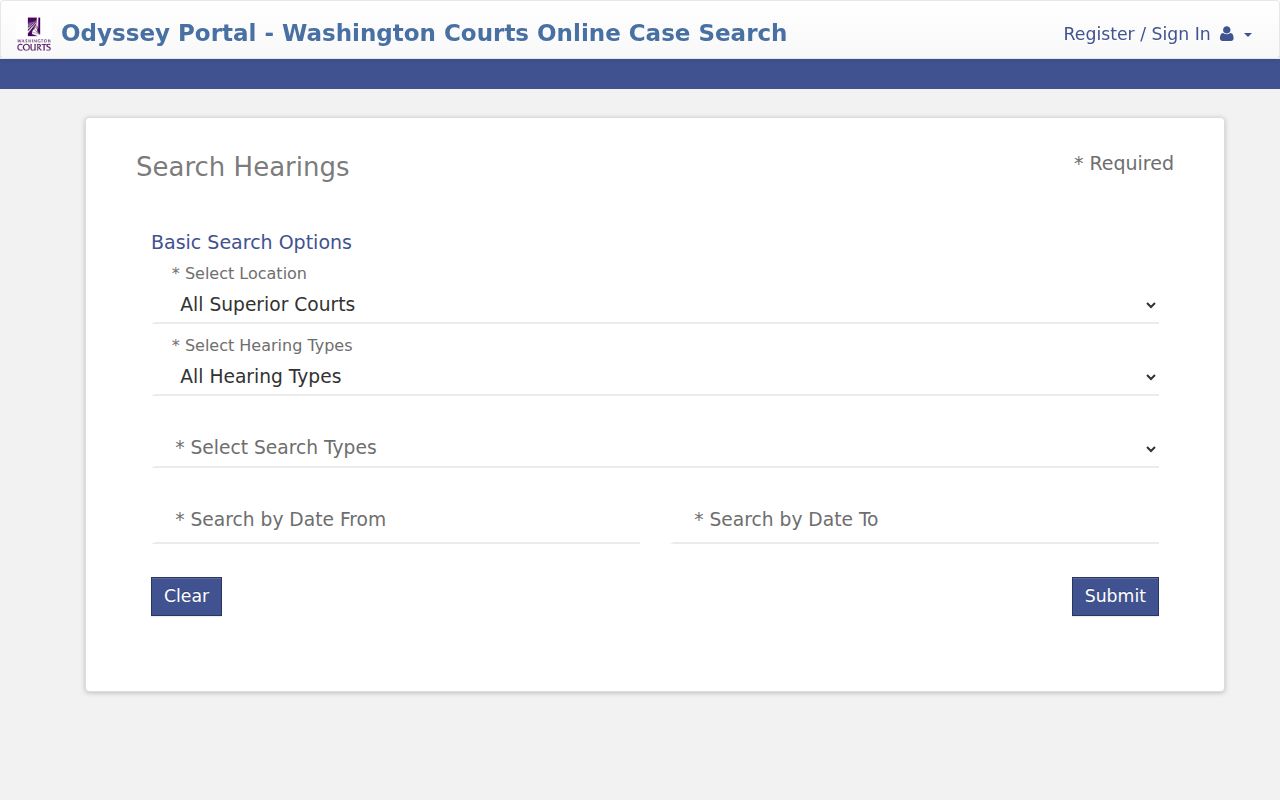
That screen is a starting point. The assigned Whatcom court or clerk should confirm the live setting.
If You Miss a Court Setting
Act promptly. Check the Whatcom County case record for a new event, then call the clerk for the court that set the hearing. Contact counsel if represented. Ask what order was entered and what process applies to a new setting. Court staff can provide public record and scheduling information, but they cannot give legal advice or promise how a judge will respond.
Missed a Setting? A missed hearing can lead to an adverse order, a warrant, or other case-specific consequence.
Contact the maintaining clerk and your attorney at once, and do not assume an online blank means no action occurred.
A licensed Washington attorney can explain the safest next step for the specific Whatcom County matter.
For municipal or District matters, Find My Court Date may show a new future setting after the court updates its data. For Superior Court, the department assistant and docket history are stronger routes. If travel or remote attendance is involved, confirm the mode as well as the date and time.